NASlab

Android app for home servers and NAS

Your NAS tells you what to do.

NASlab is the Android app for your home server. It explains in plain words what is going on, finds the cause of problems and runs your server, Docker, disks, backups and Plex from your phone.

  • No account
  • No ads
  • No tracking
  • Demo without a server

Unraid · TrueNAS, Synology, Linux (beta) · version 2.54.0 · formerly NZBLab

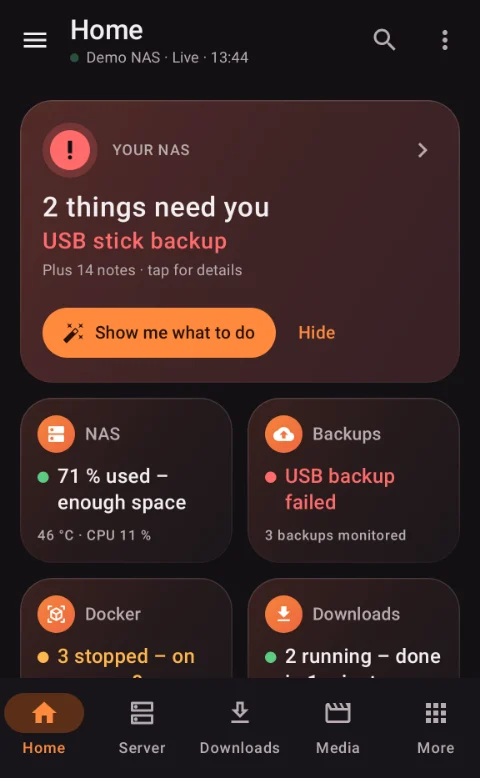
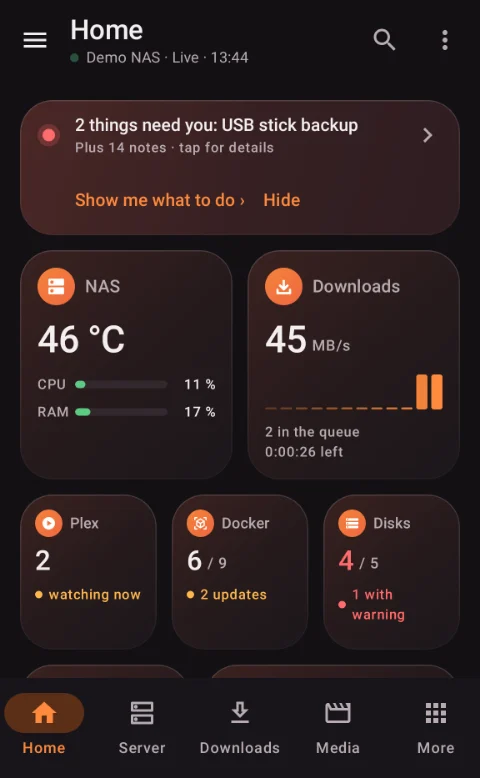
NASlab home screen in the dark theme: “2 things need you” with the button “Show me what to do”
The home screen tells you in one sentence what needs you
What NASlab does

Everything around your home server, in one app.

Instead of columns of numbers you get answers. And where something is wrong, the way to fix it.

  • Answers, not numbers

    Every tile tells you in one sentence how your NAS is doing.

  • Fix problems

    Problem center and step-by-step help until it runs again.

  • Disk early warning

    SMART history flags failing disks before data is lost.

  • Server, Docker, VMs

    Run Unraid like an app, containers and VMs included.

  • Backups in view

    Which backup ran, what is missing, and help when it matters.

  • Downloads and media

    SABnzbd, Sonarr, Radarr, Seerr, Plex and Jellyfin.

  • Security center

    What is open, who tries to log in, and what to do.

  • Widgets and alerts

    Only what matters, with buttons right in the notification.

See it in action

From problem to fix, in a few taps.

All images come from the app in demo mode, with made-up data. Tap to enlarge.

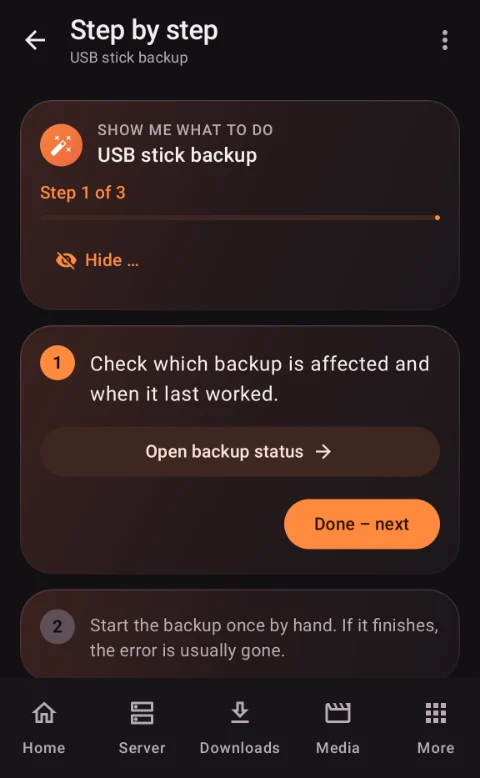
Help “Show me what to do”: step 1 of 3 with a button to the right place
Step by step to the fix
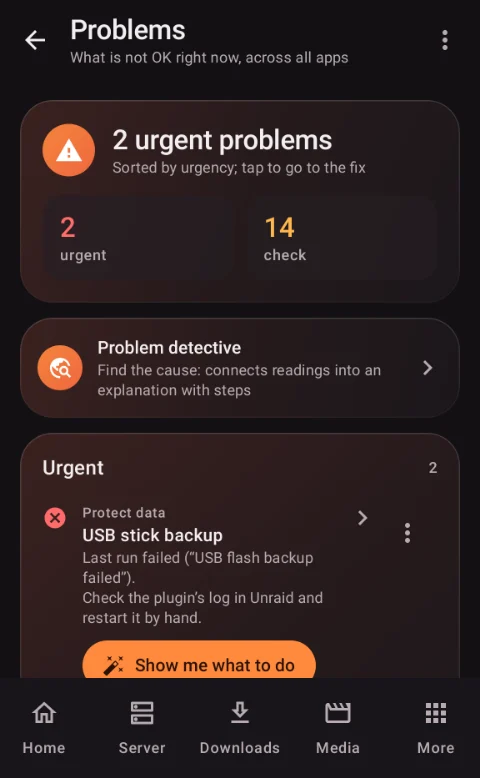
Problem center: all open items sorted by urgency
Problem center: everything in one place
Problem center

“Show me what to do”

Everything that is wrong right now is in one place, sorted by urgency. One tap, and the app walks you step by step to the fix.

  • A button takes you straight to the right place in the app
  • Dry run “What happens if …?” before critical actions
  • A check at the end: “Running now?”
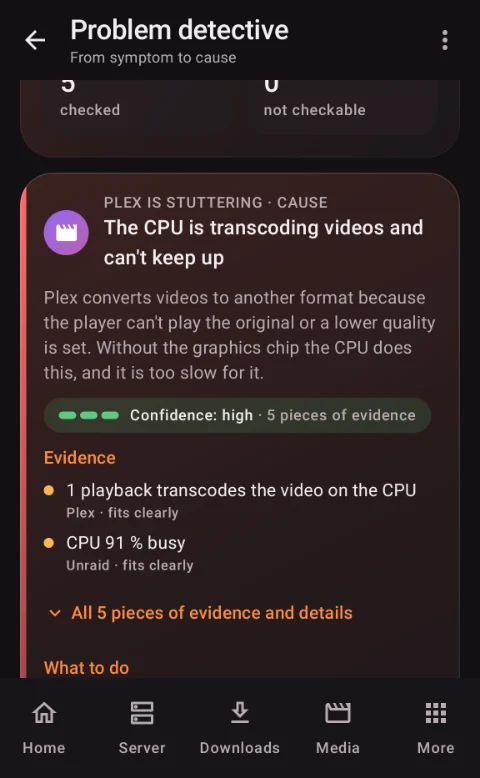
Problem detective: “Plex stutters” with the cause found and evidence
Problem detective: from symptom to cause
Problem detective

From symptom to cause

You pick what bothers you, such as “Plex stutters”, “NAS is slow” or “Downloads are stuck”. The app looks for the cause, shows the evidence and what helps.

  • Evidence, not guesswork: for example “Plex transcodes on the CPU, CPU at 91 %”
  • “Why is my NAS slow?” measures for five seconds and tells you what slows it down
  • Understand logs: errors on top, with “What it means” and “What to do”
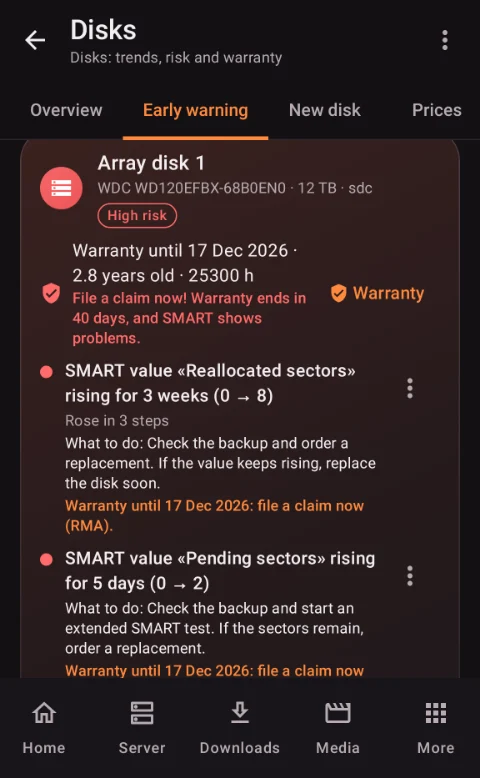
Disk early warning with SMART history, risk and warranty
Disk early warning
Disks

Spot failing disks early

Disks often announce their failure weeks ahead in their SMART values. NASlab watches the history and tells you in time what to do.

  • Early warning with an explanation: “Reallocated sectors rising for 3 weeks”
  • Warranty reminder while you can still claim it
  • Assistant for replacing a disk or adding a new one, with price history
Unraid server: overview with big buttons for array, Docker and VMs
Run Unraid like an app
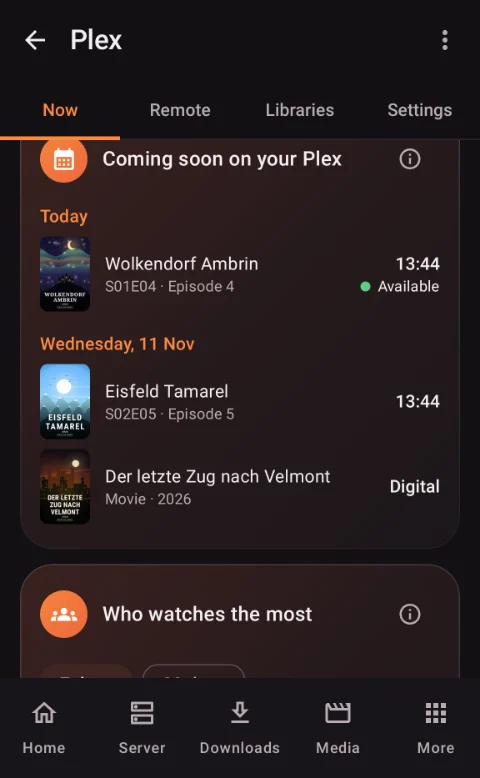
Plex: what is coming next and who watches the most
Plex: what is next, who watches
Everything in one app

Server, Docker, VMs and media

Unraid with big buttons, like an app, plus containers, virtual machines, downloads, series, movies and Plex, without switching between five web interfaces.

  • Unraid fully supported, TrueNAS, Synology and Linux in beta
  • Docker and VMs: start, update safely with a way back, VM screen inside the app
  • Plex and Jellyfin: who is watching, is it smooth, can friends reach it from outside
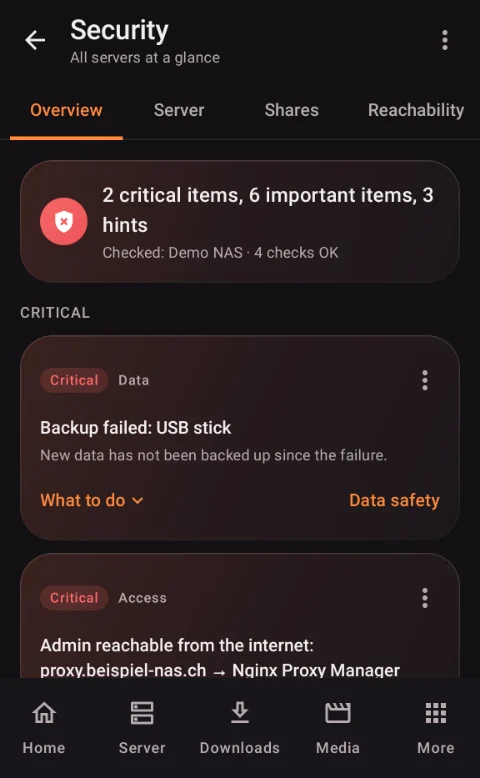
Security center with critical items across all servers
Security at a glance
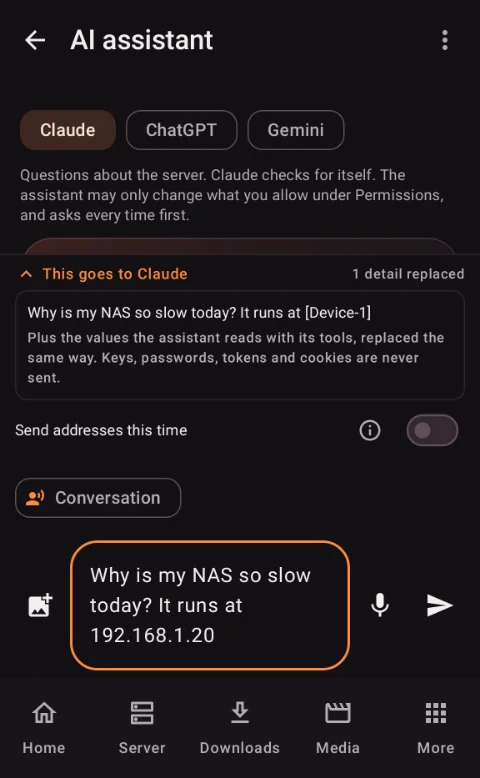
AI assistant with the preview “This goes to Claude”, the address replaced by a placeholder
AI only if you want it, with a preview
Security and privacy

See what leaves your phone

The app has access to your server. That is why it protects your keys, checks your NAS for open doors and sends nothing without your okay.

  • Security center: login attempts with country, services without a password, what is reachable from the internet
  • Keys encrypted on your phone, locked on unknown Wi-Fi
  • AI only if you want it: your own key, preview “This goes to …”, addresses replaced

More from the app

Home screen in the “Advanced” view with all tiles
“Advanced” home screen
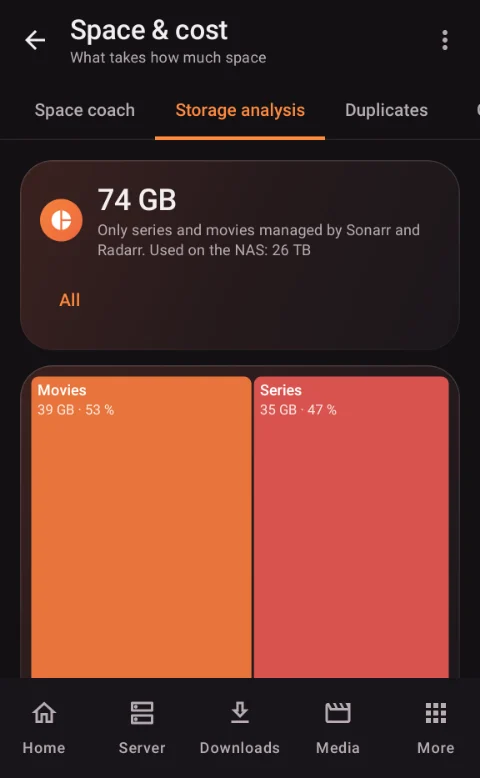
Storage analysis as a tile chart
Storage analysis
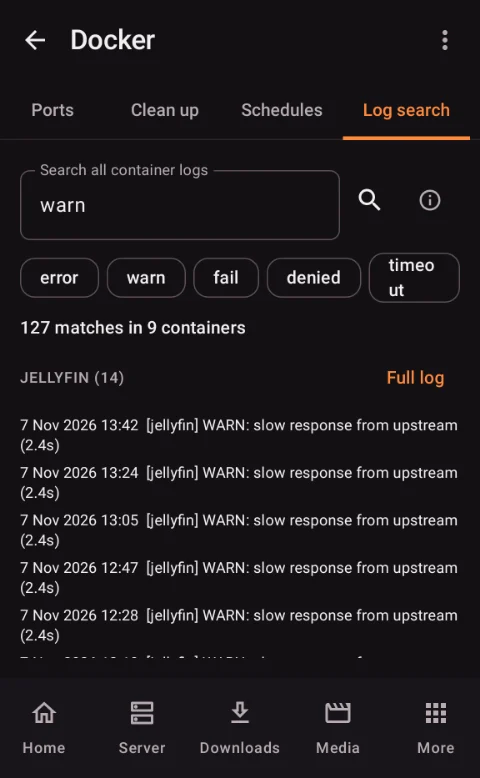
Search for warnings across all container logs
Search all logs
Works with

Your services, one app.

  • Unraid 7.2+
  • TrueNAS (beta)
  • Synology (beta)
  • Linux (beta)
  • Docker
  • VMs
  • SABnzbd
  • Sonarr
  • Radarr
  • Prowlarr
  • Seerr / Overseerr / Jellyseerr
  • Plex
  • Tautulli
  • Jellyfin / Emby
  • Immich
  • Home Assistant
  • Nextcloud
  • Paperless-ngx
  • Syncthing
  • Tdarr / Unmanic
  • Frigate
  • Uptime Kuma
  • AdGuard Home / Pi-hole
  • Vaultwarden
  • Nginx Proxy Manager
  • Tailscale / WireGuard
  • Kopia
  • Speedtest Tracker
  • Portainer
  • Netdata
  • Scrutiny
  • myStrom / Shelly / Tasmota

Unraid is fully supported. TrueNAS, Synology and Linux are in beta: built from the official documentation, some values or buttons may still be missing. Android 9 and newer, English and German. NASlab only controls services you run yourself and contains no content, indexers or servers of ours.

Optional

NASlab agent

A small, free container for your NAS, with public source code. It measures around the clock, even while your phone sleeps, and only reads. It changes nothing on your NAS.

  • History without gaps: temperatures, CPU, GPU, RAM
  • Duplicates, inventory and a file index across the whole NAS
  • Detects backups: restic, borg, Kopia, rsync
Install the agentWithout the agent the app works as usual. Setup takes about 5 minutes.
Privacy

Your data stays with you

No account, no ads, no tracking, no analytics. The app only talks to the services you enter yourself.

  • Keys and passwords encrypted in the Android keystore
  • Connections on your home network or over your VPN
  • AI is optional: only after “Send”, keys and passwords never go along
In detail

The 12 areas

Tap to expand. Features only appear in the app when the matching service is connected. That keeps it tidy.

01Answers, not numbersThe app reads your NAS values and turns them into sentences you understand without expert knowledge. Where something is wrong, it shows you the way to the fix.
Home

“Today at a glance”

At the top, one sentence says how your NAS is doing and what needs you right now. In the “Simple” view every tile states its condition in words.

  • “All running” or “2 things need you”
  • “Space lasts about 8 more months”
  • What ran today: downloads, new episodes, backups, hottest minute
Problem detective

From symptom to cause

You pick what bothers you, the app looks for the cause and shows the evidence and the steps to fix it.

  • “Stream stutters”, “NAS unreachable”
  • “Downloads stuck”, “too hot”
  • Example: Plex converts video on the CPU, CPU at 91 %
Help

“Show me what to do”

Step by step to the fix, with a button to the right place and a check at the end. Before critical actions there is a dry run: “What happens if …?”.

  • Start a stopped container, turn off autostart or hide it
  • At the end: “Running now?”
NAS check

A grade from 1 to 10

Data protection, security, maintenance, monitoring and remote access at a glance, with a to-do list. The problem center collects everything that is wrong right now, sorted by urgency.

  • Hide items you accept on purpose, they no longer lower the grade
  • They come back by themselves if things get worse
Time machine

What has changed?

Updates, restarts, notifications and hot days on one timeline over 24 hours, 7 or 30 days. Plus “Why is my NAS slow?”: five seconds of measuring, then the app tells you what is holding it back.

  • Storage forecast: when will it be full?
  • Maintenance mode: no outage alerts while you work on the NAS
02Control your NASUnraid 7.2 and newer is fully supported. TrueNAS, Synology and Linux servers run in beta: built from the official documentation, some values or buttons may still be missing.
Unraid

Your server like an app

Large buttons for array, parity check, mover, backup, Docker, VMs, notifications, shares, reboot and shutdown. Risky actions ask first, with your fingerprint if you like.

  • Storage like “Main”: parity, data, cache, status and usage per disk
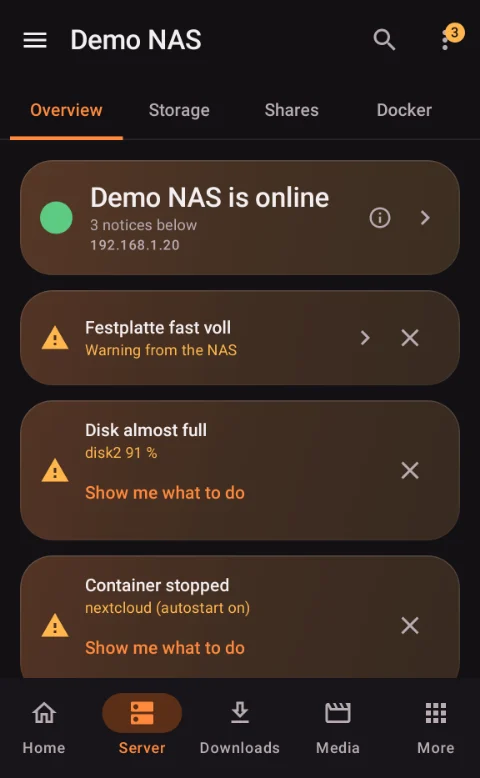
  • Notifications explained, with “What to do”
  • All other Unraid pages as an embedded web interface
Docker · VMs

Containers and virtual machines

Start, stop and update containers, read logs, live CPU and RAM. Start VMs and use their screen right in the app with the built-in VNC client.

  • Changelog before updating, safe update with a way back
  • Ports, autostart order, schedule per container
  • VM screen with Swiss, German or US keyboard, zoom and sound
Several systems

Unraid, TrueNAS Beta, Synology Beta, Linux Beta

Several servers in one app, switch with one tap. “Search the network for servers” finds your NAS on your home network, also over VPN.

  • Synology extras: cameras, Cloud Sync, DSM updates, blocked sign-in attempts
  • Linux: Docker via Portainer
  • What a system cannot do does not show up at all
App store

Install apps from your phone

The Unraid app catalog with search and categories, installed through a phone form. The app checks name, port, required fields and paths and warns about dangerous settings.

  • User, permissions and time zone sensibly prefilled
  • “My apps”: all containers as tiles with update hints
03Disks & storageDisks often announce their failure weeks ahead in their SMART values. NASlab watches these values and tells you in time what to do.
Early warning

Spot failing disks early

SMART history per disk: when critical values rise, the app warns you with an explanation and a recommendation. The warranty alarm reminds you while you can still claim.

  • “Reallocated sectors rising for 3 weeks”
  • “Warranty ends in 40 days”
  • All SMART values, even more detail with Scrutiny
New disk

New disk assistant

Do you need a parity disk, how big, what does it cost today? Step by step to installation, plus a guide for replacing a disk after a SMART warning.

  • Disk prices with history and a “good price” alert
  • With the agent, the price of your exact model
Disk sleep

Who wakes the disks?

How often each disk spins up after a rest and who woke it, with a tip against it and the power cost per month.

  • Plex, SMB, SABnzbd as the cause
  • Which disk spins or sleeps, and since when
Storage

What takes how much space?

Storage analysis as a treemap, the 50 biggest files, growth per share and a space coach. The shares check verifies that appdata, system and domains are in the right place.

  • Storage cost per series and movie
  • docker.img: what fills the image?
04Backups and data safetyA backup only helps if it really runs. NASlab shows which backup ran when, reports errors and gaps, and helps when it matters.
Overview

Data safety at a glance

Data checks, backup tasks and UPS for Unraid, TrueNAS and Synology. The backup calendar shows errors and gaps in red, the data risk light what you would lose in a failure, as a PDF to share.

  • Unraid: parity and backup plugins; TrueNAS: scrub, snapshots, replication; Synology: Hyper Backup
  • USB flash drive reminder every 30 days
Kopia · agent

Back up now

For Kopia you see the last backup, size, errors and next run, and start a backup after confirming. The agent detects backups made with restic, borg, Kopia and rsync.

  • Alert when a backup is older than 2 days
  • Appdata and VM backup live with progress
Mover

Mover live

Since when it runs, how much has moved, speed and time left, also as live progress on the lock screen. The night plan shows what runs at night and where things overlap.

  • “about X to move” without backup and system pools
  • With the agent: cache and mover per share
Emergency

Backup rescue and emergency help

Backup rescue, an emergency card and an emergency drill help when it counts. The emergency inventory saves a list of all movies and series every Sunday.

  • Maintenance calendar with reminders
  • Back up the settings of your services
05Temperature, power and power outagesHeat and power costs are a constant topic with a home server. NASlab measures, explains and can step in by itself.
Temperature

Why was it hot?

History for today, yesterday, 7 and 30 days, hot phases with the containers, programs and events running at the same time. The sensor archive keeps up to 400 days.

  • Mover, parity, backups or Plex as the cause
  • Temperature over the year, summer versus winter
Automation

Heat autopilot and fans

If the CPU stays too hot for too long, the app slows downloads, pauses Plex maintenance and turns the fans up, then sets everything back. Every action comes as a notification.

  • Fan control (with the matching Unraid plugin)
  • Sleep mode and streaming priority
Power

Usage and cost

Live watts, kWh and cost per day, month and year with myStrom, Shelly, Tasmota or Home Assistant. Estimated power share per container.

  • Set your own electricity price
  • Room temperature from Home Assistant next to the NAS temperature
UPS

Power outage alert

When the UPS reports “on battery”, you get one warning, then “power is back”. For every server type with UPS values.

  • In the background the app checks at most every 15 minutes
06Downloads, series and moviesEverything you expect from an app for SABnzbd, Sonarr, Radarr, Prowlarr and Seerr, plus explanations when something goes wrong.
SABnzbd

Downloads

Queue with speed and time left, pause for 5 minutes up to 6 hours or until 07:00 tomorrow, throttle on a schedule. Failed downloads with “Why?” in one sentence.

  • Readable names instead of release names
  • Add NZBs by file, link or “Share”
  • Prowlarr: search all indexers at once
Sonarr · Radarr

Series and movies

Library, seasons, episodes, monthly calendar, missing episodes, automatic and interactive search. The queue tells you in one sentence what is going on.

  • Edit many entries at once
  • “Delete with files” moves to the trash
  • Media report with a quality finder
Seerr

Requests

Approve or decline requests, also right in the notification. “Where is my request stuck?” shows why a request does not arrive.

  • Share a title from Netflix, IMDb or the browser and request it
  • Works with Seerr, Overseerr and Jellyseerr
07Plex, Jellyfin and TautulliWho is watching, does it play smoothly, and can friends reach your server from outside?
Plex

Who is watching what

Current streams with picture and progress, and whether the GPU or the CPU converts the video. Stop streams with a message to the viewer (Plex Pass).

  • “Can a friend watch right now?” as a traffic light
  • Continue watching, recently added, “What shall we watch tonight?”
  • Plex tips: hardware transcoding, maintenance window, preview thumbnails
Remote control

Pause, audio track, subtitles

Pause, resume, stop and switch audio track and subtitles, for Plex and Jellyfin/Emby. “Check library” finds 4K, HDR, missing languages and duplicate versions.

  • Plex Web and the desktop app do not accept remote control
Tautulli · Jellyfin

Statistics

Most watched, who watches most, devices, transcoding per device and title. Jellyfin and Emby with streams, library, statistics and notifications.

  • Statistics from the Plex history, even without Tautulli
  • Weekly review on Sunday
08Apps on your NASMany popular self-hosted apps have their own page in NASlab. Apps in Unraid Docker are detected, address and port are prefilled.
Photos · home

Immich and Home Assistant

Immich: photos, storage, warning when a phone backup is stuck, “one year ago today”. Home Assistant: open windows, switch lights, who is home, start scenes.

  • Alert: window open and nobody home
  • “Light” quick settings tile in the Android menu
Documents · cloud

Nextcloud, Paperless-ngx, Syncthing

Users and storage, shared links without a password, inbox with preview, import errors, whether all folders are in sync.

Network · services

Uptime Kuma, ad blocker, proxy, VPN

Outages and expiring certificates, AdGuard Home or Pi-hole with “Pause 10 min”, Nginx Proxy Manager with “Renew”, Tailscale and WireGuard devices.

  • Vaultwarden: is it running, is sign-up open (no passwords)
  • Speedtest Tracker with history
Video · cameras

Tdarr, Unmanic, Frigate

Current transcode with speed and time left, space saved. Frigate: live view, latest events with picture, today's recordings.

09FilesA file browser for your NAS over SMB, with search across everything and a trash that never deletes directly.
SMB

File browser

Open folders, sort, upload, move, rename, select several. “Move to trash” with a log and restore. Images with preview and zoom.

  • Share › “To NAS” from any app
  • SMB with signing and encryption
Index

Search across all folders

The search also finds inexact input. With the agent across the whole NAS, instantly, and the index renews itself every 6 hours.

  • Find duplicates and move them to the trash
  • Inventory of all movies and series with missing episodes
10Understanding logs and the AI assistantFor most people a log is a wall of text. NASlab sorts and explains it, without AI and without internet. If you want, you can add an AI explanation, always with a preview.
New in 2.51

Understand logs

Errors and warnings are listed at the top of the log, a tap jumps there, “Errors only” hides the rest. The app explains common errors by itself, with “What it means” and “What to do”.

  • Missing permissions, port in use, disk full
  • Database locked, certificate, timeout
New in 2.53 · agent 1.16 coming soon

Everything connected in one minute

With the optional NASlab agent the app finds the services on your NAS, including address and key. You connect them with one tap on “Connect”. Keys stay encrypted on the phone. The agent only reads keys if you allow it; DISCOVER_KEYS=0 turns that off. The app is ready; the matching agent 1.16 follows shortly.

  • Sonarr, Radarr, Prowlarr, SABnzbd, Tautulli, Seerr
  • Each service is tested before it is connected
New in 2.54

No empty spinner, fewer prompts

The main pages show the last known state instantly (“Updated X min ago”). If it takes longer, the app says after 8 seconds what it is waiting for; after 20 seconds you get a clear message with “Try again”. Harmless actions run immediately and can be undone with “Undo”; dangerous ones still ask, e.g. with fingerprint.

  • “Warranty until”: enter the end date directly, as the shop shows it
Optional

“Explain with Claude”

Sends only the error lines, secrets removed, addresses as placeholders. You see “This goes to …” first, and nothing is sent until you tap “Send”.

AI assistant

Claude, ChatGPT or Gemini

Questions about your NAS with your own API key, also by voice and with pictures. The assistant checks for itself and only acts with permissions you grant.

  • Never delete, array, updates or settings
  • Can be switched off completely
11SecurityThe app has access to your server. That is why it protects your keys and also checks the NAS itself.
Home network

Keys only to your own network

On a foreign Wi-Fi the app sends no keys until you confirm once “This is my home network”. Self-signed certificates are confirmed once and then pinned.

  • http only to home network and VPN addresses
  • Updates checked for signature before installing
Security center

What is open, and why?

Across all servers: sign-in attempts with country, services without a password, share permissions, what is reachable from the internet. With a setup coach.

  • Bait files against ransomware with an instant alarm
  • “Close everything from outside” in Nginx Proxy Manager
Phone

App lock and encryption

Keys and passwords encrypted in the Android keystore, app lock with fingerprint, settings export only encrypted with a password. The “Trust” page shows who the app talks to.

  • Find services with the agent and connect them with one tap, keys stay encrypted on the phone
  • Faster start on slow phones: no more freezing while the stored keys load
  • No empty spinner: last state instantly, a hint after 8 seconds, “Try again” after 20 seconds
  • Fewer prompts, more “Undo”; dangerous actions still ask
  • “Warranty until”: enter the end date directly
  • Safer key storage; the agent only reads keys if allowed (DISCOVER_KEYS=0 turns it off)
  • 12Widgets, notifications and quick accessWhat matters without opening the app, and only notifications that really count.
    Widgets

    On your home screen

    “Your NAS in one sentence”, “What needs me?”, space, backups, disks, security, temperature, downloads and many more areas. Plus buttons for pausing and waking the NAS.

    Notifications

    Only what matters, with buttons

    The default is “Important only”: disks, backups, security, NAS gone, space, heat. Buttons right in the notification, live progress on the lock screen.

    • Good morning and weekly report
    • Every kind can be turned off, quiet hours at night
    Home

    The way you want it

    Drag tiles, choose sizes, add pages. Or say what you use your NAS for, and the app builds a matching home screen. Quick settings tiles: “Wake NAS”, “Mover”, “Light”, “SABnzbd”.

    All features as a listOver 200 features by area, one line each

    Anything marked “beta” is built from the official documentation; some values or buttons may still be missing.

    Home, overview and help
    • “Today at a glance”: status in one sentence, what ran today, every problem with its fix
    • Two views: “Simple” (one sentence per tile) and “Advanced” (all values)
    • Home screen by purpose: movies, photos, backups, smart home or tech, with “Undo”
    • Arrange the home screen freely: drag tiles, small, medium or wide, several pages, templates, tile colors
    • “Tonight” tile: what ran last night and what is planned tonight
    • “Shortcuts” tile with your own buttons, “Recently added” tile with posters
    • Problem detective: from symptom to cause, with evidence and steps
    • “Show me what to do”: step by step, with a check at the end
    • Problem center: everything that is wrong, sorted by urgency
    • NAS check with a grade from 1 to 10 and a to-do list
    • Hide hints just this once or deliberately for good; they return if things get worse
    • “Why is my NAS slow?”: measures CPU, RAM, disks, parity, mover, containers, VMs, Plex and downloads
    • NAS time machine “What has changed?” over 24 hours, 7 or 30 days
    • Storage forecast and maintenance mode
    • “Today on the NAS”: the last 24 hours in one list (with agent)
    • Dry run before critical actions, update assistant
    • Offline view with the last known values and a diagnosis of why the NAS cannot be reached
    • Search everywhere: series, movies, containers, files and every page of the app
    • ⓘ explanations on every page, glossary for technical terms, intro tour
    • Yearly NAS review to share, weekly review as PDF
    Server control: Unraid
    • Overview: online status, uptime, version, CPU with history and per core, RAM, array, pools, network, UPS
    • Control panel with large buttons: start/stop array, parity check, mover, backup, reboot, shutdown
    • Storage like “Main”: parity, data, cache, per disk status, temperature, standby, usage, errors
    • Shares with usage, growth per share, watcher with your own limit
    • Unraid notifications explained with problem and “What to do”, archive
    • Logs with filter and live mode, syslog watcher for disk and kernel errors
    • Parity check history, progress as a notification
    • Wake-on-LAN, the app remembers the MAC address itself
    • RAM usage split into ZFS cache, Docker, VMs and programs
    • ZFS mirror: device status and last scrubs
    • Settings: server name, SSH, time/NTP, array autostart
    • All other Unraid pages as an embedded web interface with saved sign-in
    • Reboot detects when the NAS is really back
    Docker, VMs and app store
    • Start, stop, restart, pause containers, logs, web interface
    • Live CPU, RAM and network per container, estimated power share
    • Updates: “Check for updates now”, “Install N updates”, progress per container
    • Changelog before updating, version history and a way back to the old version
    • Safe update: checks afterwards that the container runs and responds
    • Autostart order with delay, ports with conflicts
    • Remove orphaned containers including the image
    • Schedule per container (e.g. game server only in the evening)
    • Search all container logs, log watcher with alerts on errors
    • Alert when a container is “unhealthy” or has stopped
    • docker.img: usage, what fills the image, guide to enlarge it
    • “My apps”: all containers as tiles with icon, status and update hint
    • App store: Unraid app catalog with search and categories, install through a checked phone form
    • Warning about dangerous container settings
    • VMs: start, shut down, restart, pause, force off
    • “Start & connect”: VM screen right in the app (VNC), with gestures, CH/DE/US keyboard, zoom and sound
    • Remote access to VMs via RDP or SSH in suitable apps
    Other systems and several servers
    • TrueNAS 25.04 and newer Beta: pools, disks, shares, apps, VMs, notifications, scrub, snapshots, replication, Cloud Sync
    • Synology DSM 7 Beta: storage, data scrubbing, Hyper Backup, UPS
    • Synology extras Beta: Surveillance Station cameras, Cloud Sync, DSM and package updates, QuickConnect, sign-in attempts
    • Linux servers such as Debian or Ubuntu Beta: overview, storage, disks and temperatures via the agent, Docker via Portainer
    • “Search the network for servers”: finds Unraid, Synology, TrueNAS and Linux on your home network, also over VPN
    • Find services automatically: SABnzbd, Sonarr, Radarr, Prowlarr, Plex, Tautulli, Seerr and more
    • Monitor several servers at once, switch with one tap
    • Values, automations and history stay with the right server
    Disks and storage
    • Disks with role, model, serial number, temperature and SMART status
    • All SMART values: power-on hours, power cycles, bad sectors, wear (more detail with Scrutiny)
    • Early warning with SMART history and a recommendation
    • Warranty alarm
    • New disk assistant, parity & disk replacement step by step
    • Disk alarm on status change, new bad sectors or heat
    • Your own name per disk, e.g. “Backup left”
    • Disk sleep and “Who wakes the disks?” with power cost
    • Disk prices with history and a “good price” alert (Switzerland automatic, other countries via browser search)
    • Storage analysis as a treemap, the 50 biggest files
    • Space coach and space & cost: what each series and movie costs in storage
    • Shares check: are appdata, system and domains in the right place?
    • Storage cleaner: biggest folders, duplicates, samples, using the trash instead of deleting
    Backups, mover and data safety
    • Data safety for Unraid, TrueNAS and Synology: data checks, backup tasks, UPS
    • Backup calendar: which backup ran when, errors and gaps in red
    • “Backups” tile with a traffic light per backup (appdata, VMs, USB flash drive)
    • Appdata and VM backup live with phase, progress and current container
    • “Backup & mover”: one button backs up Docker first, then the VMs
    • Kopia: last backup, size, errors, next run, “Back up now”
    • Backup detection with the agent: restic, borg, Kopia, rsync
    • Backup rescue, emergency card and emergency drill
    • Data risk light: what you would lose in a failure, with a system report as PDF
    • Emergency inventory: a list of all movies and series every Sunday (CSV)
    • USB flash drive reminder and external backup reminder
    • Maintenance calendar: parity, backups, SMART long test, updates, dust to tick off
    • Mover live: speed, moved, time left, current file, “Start mover”
    • Mover per share: what stays on the cache and what gets moved (with agent)
    • Night plan: mover, parity, Plex maintenance and backups with overlaps
    • Back up the settings of your services
    Temperature, fans, power and UPS
    • Temperatures with readable names: CPU with all cores, disks, network, mainboard
    • Live CPU curve of the last hour, lowest and highest value of the day
    • Temperature statistics: history, hot phases with cause, heat log as CSV
    • Sensor archive up to 400 days, temperature over the year
    • Sensors page: every reading with a traffic light and a 24-hour curve
    • Heat alarm with cause and tip
    • Heat autopilot: slow downloads, pause Plex maintenance, fans up
    • Fan control and fan automation (with the matching Unraid plugin)
    • Sleep mode: notifications muted, downloads throttled, disks asleep, back in the morning
    • Streaming priority: when someone watches Plex, downloads and parity check pause
    • Power with myStrom, Shelly, Tasmota or Home Assistant: live watts, kWh, cost per month and year
    • UPS values for all server types, alerts for a power outage and “power is back”
    Downloads (SABnzbd, Prowlarr)
    • Queue with progress, speed, time left and free space
    • Pause everything, for 5 minutes up to 6 hours or until 07:00 tomorrow
    • Speed limit and scheduled throttling
    • Per download: pause, priority, category, move, rename, delete
    • History with status, “Why did it fail?” in one sentence and “Search another version”
    • Readable names instead of release names, every abbreviation explained
    • Add NZBs by file, link or “Share”, only after unlocking
    • Download volume today, 7 and 30 days, downloads per month with success rate
    • Live progress of large downloads on the lock screen
    • Prowlarr: status of all indexers and search across all at once
    • Newznab search with saved searches, send results to SABnzbd, Sonarr or Radarr
    Series, movies and requests (Sonarr, Radarr, Seerr)
    • Library with search, sorting, filters and progress per series
    • Seasons and episodes, monitor on/off
    • Automatic and interactive search with rejection reasons
    • Add a series or movie, change profile; “Delete with files” moves to the trash
    • Many entries at once: monitoring, quality profile, search
    • Monthly calendar, missing episodes by season
    • Queue explained in one sentence, with “Import manually”
    • Media report: storage per title, growth per month, quality finder
    • Language watcher: alert once a title with German audio is imported; search for a German version
    • Seerr: approve or decline requests, also in the notification
    • “Where is my request stuck?”, resend or clean up stuck requests
    • Share › “Request in Seerr” from Netflix, IMDb, YouTube or the browser
    Plex, Jellyfin/Emby and Tautulli
    • Who is watching what, with picture, progress and whether the GPU or CPU transcodes
    • “Can a friend watch right now?” as a traffic light, remote access check
    • Stop streams with a message (Plex Pass)
    • Remote control: pause, resume, stop, audio track and subtitles (Plex, Jellyfin/Emby)
    • Continue watching, recently added, coming soon, “What shall we watch tonight?”
    • Check library: 4K, HDR, languages, unwatched, duplicate versions
    • Rescan libraries, empty trash and optimize database, simply explained
    • Plex tips: hardware transcoding, maintenance window, preview thumbnails
    • Tautulli: most watched, who watches most, devices, transcoding per device and title
    • Statistics from the Plex history when Tautulli is missing; hint when Tautulli records nothing
    • Jellyfin and Emby: streams, library, statistics, stop playback
    Apps on your NAS
    • Immich: photos, storage, last upload, “one year ago today”, people, places, shared links
    • Home Assistant: windows, doors, lights, who is home, temperatures, weather, batteries, scenes
    • Nextcloud: users, storage, updates, shared links without a password
    • Paperless-ngx: documents, inbox with preview, import errors
    • Syncthing: folders in sync, devices online, errors
    • Tdarr and Unmanic: current transcode, queue, space saved
    • Frigate: live view, events with picture, today's recordings
    • Uptime Kuma: services, response time, availability, certificates, alert on outage
    • AdGuard Home and Pi-hole: queries, blocked, “Pause 10 min”
    • Vaultwarden: status, version, open sign-up (no passwords)
    • Nginx Proxy Manager: domains, certificates with “Renew”, “Close everything from outside”
    • Tailscale and WireGuard devices
    • Speedtest Tracker: internet speed with history and how many remote viewers Plex can serve
    • Portainer for Docker on Linux servers
    • Netdata and Scrutiny for system and SMART values
    • Alerts from your apps: Immich backup stuck, Syncthing out of sync, window open and nobody home
    • Apps in Unraid Docker detected, address and port prefilled
    • Web interfaces of all services in the ☰ quick access, with saved sign-in
    Files and home network
    • File browser over SMB: open, sort, filter, upload, new folder, move, rename
    • Select several, “Move to trash” with a log and restore
    • Image viewer with swiping and zoom
    • Share › “To NAS” from any app
    • File index: search across all folders, even with inexact input
    • Duplicate finder using the trash instead of deleting (with agent)
    • Inventory of all movies and series with missing episodes (with agent)
    • Share, download or export as PDF the same way everywhere
    • Home network: devices on the network and speed test (with agent)
    • Remote access assistant for WireGuard in 4 steps
    • Reachable from outside? DuckDNS and certificate check
    • Availability per service over 7 days
    Logs, AI assistant and explanations
    • Understand logs: errors and warnings at the top, a tap jumps there, “Errors only”
    • Built-in explanations without AI for common errors, with “What it means” and “What to do”
    • “Explain with Claude”: only error lines, with a preview and only after “Send”
    • AI assistant with Claude, ChatGPT or Gemini and your own API key
    • Voice input, conversation mode and up to 3 pictures
    • Addresses and names are replaced by placeholders before sending, “This goes to …” shows everything
    • Permission model: grant actions one by one, each with confirmation
    • Have unknown Unraid notifications explained, AI check of your NAS
    • Action log: everything changed on the NAS, for a year
    • Error log with “What happened” and “What to do”
    • In demo mode a simulation answers without a key
    Security and privacy
    • Keys and passwords encrypted in the Android keystore, not in the cloud backup
    • Home network check: no keys on foreign Wi-Fi until you confirm “This is my home network”
    • Certificate pinning for self-signed certificates, changed certificates are detected
    • http only to home network and VPN addresses, optionally only on Wi-Fi or with VPN
    • App lock with fingerprint or PIN, hide content
    • Fingerprint before critical actions
    • Settings export only encrypted with a password, transfer to a second phone via QR code
    • Security center: sign-in attempts with country, services without a password, share permissions, reachable from outside
    • “Share to NAS” only accepts files from other apps and asks for the app lock
    • Docker and Seerr buttons in notifications need an unlocked phone; the Sonarr/Radarr folder protection can't be bypassed with path tricks
    • Bait files against ransomware with an instant alarm
    • Sign-in watcher for Unraid and SSH
    • Updates checked for sender and signature before installing
    • Buttons in notifications only work for exactly that server
    • “Trust” page: what the app may do, who it talks to, where your keys are
    Widgets, notifications and handling
    • Widgets: “Your NAS in one sentence”, “What needs me?”, space, backups, disks, security, today, next maintenance
    • Widget with freely chosen areas, “Buttons” widget, “Mini” widget, “NAS status” widget
    • Quick settings tiles in the Android menu: “Wake NAS”, “Mover”, “Light”, “SABnzbd”
    • App shortcuts: “Why slow?”, “Pause downloads”, “Search”
    • Live progress on the lock screen: mover, large downloads, parity check
    • “Important only” notifications by default, every kind can be turned off, quiet hours
    • Buttons in notifications: retry, archive, view disk, view logs
    • Good morning report and weekly report
    • Notification history of the last 30 days
    • “Undo” after pausing, stopping and hiding
    • Password managers in all sign-in fields
    • Tablet and landscape in two columns, larger text, high contrast
    • Less battery: background checks in stages, only urgent ones when the battery is low
    • Swipe between tabs: Server, Plex, media library, Sonarr, Radarr, Prowlarr, Tautulli, Seerr, Jellyfin, Docker and inventory
    • Data saver on mobile data
    • English and German, light and dark design
    • Demo mode: all services simulated, no server of your own needed
    • Feedback with a screenshot, black out addresses, only through your own mail app
    FAQ

    Frequently asked questions

    Which NAS do I need?

    Unraid 7.2 and newer is fully supported. TrueNAS (25.04 and newer), Synology DSM 7 and Linux servers such as Debian or Ubuntu run in beta: built from the official documentation, some values or buttons may still be missing. Many features for downloads, media and apps work with any system running those services.

    Do I need the NASlab agent?

    No. The app works without the agent. The agent adds features that need to measure around the clock, such as history without gaps, disk activity, duplicates, inventory, backup detection or disk prices. The agent is free, its source code is public, and it only reads.

    Does it work away from home?

    Yes, most safely over a VPN to your home, for example WireGuard or Tailscale. Then the same addresses apply as at home, and you do not have to expose anything to the internet. The app only allows unencrypted connections on your home network or over VPN. Without a connection it shows the last known values.

    Is my data sent anywhere?

    No. The app only talks to your own services. There is no account, no tracking and no server of ours. Only if you use the AI assistant with your own key and tap “Send” yourself does the request go to the provider you chose, with a preview and without keys and passwords.

    What does the demo show?

    On first start, tap “Try without a server”: the app starts built-in demo services on your phone, with an Unraid server, SABnzbd, Sonarr, Radarr, Plex and more, all with made-up data. Nothing leaves your phone. This lets you look at almost every page before you set anything up.

    Can NASlab harm my NAS?

    Risky actions always ask first, with your fingerprint if you like. Deleting moves to the trash wherever possible. The AI assistant may only do what you grant one by one, and never delete, control the array, install updates or change settings.

    When will the app be on Google Play?

    NASlab is in a closed test on Google Play. You can join via this link. If Google says it is not available, get in touch via the contact page and we will add you. Once the app is public, the regular store link will be here.

    Try NASlab

    Demo mode needs neither a server nor an account: on first start, tap “Try without a server”. The agent is optional.